Paintball Map Guidelines
Even Maps - Each side of the map should be even, as such to ensure that neither team has the advantage because of the map. The easiest way to do this is to create one side and then copy it over to the other side.
Parkour/Structures - There should be parkour shattered around the map that players can jump up on as a last-ditch attempt to dodge a snowball, as well as structures scattered around to prevent it from just being completely open.
Movement - Whilst we do want structures and parkour around the map, every player should be able to sprint throughout the map, so make sure you aren't slowing the movement down too much with your structures.
Cover - Allow for cover that players can hide underneath.
Walls - The map should be surrounded by walls or another method to prevent players from escaping. This is to ensure that the players aren't consistently looking in non-accessible places for enemies.
Team Indicators - It should be very obvious to tell which side of the map you are on when playing Paintball, you should use blue and red coloured blocks respectively when doing this.
Datapoints
Located below are the data points required when creating a Paintball map. If you do not include all of these data points, or any are missing, your map will be rejected and returned back to you until they are added.
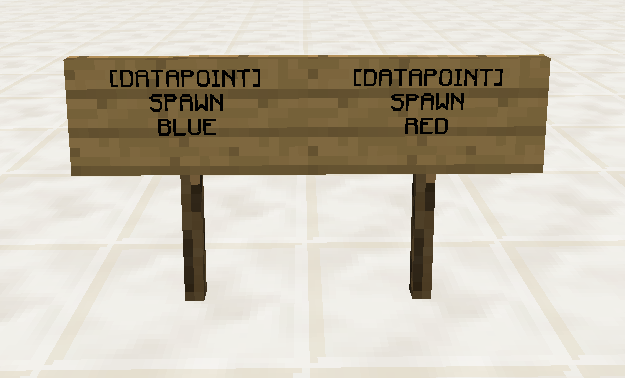
Spawn Points
You should have at least 5 and up to 8 spawn points in the spawn of each team
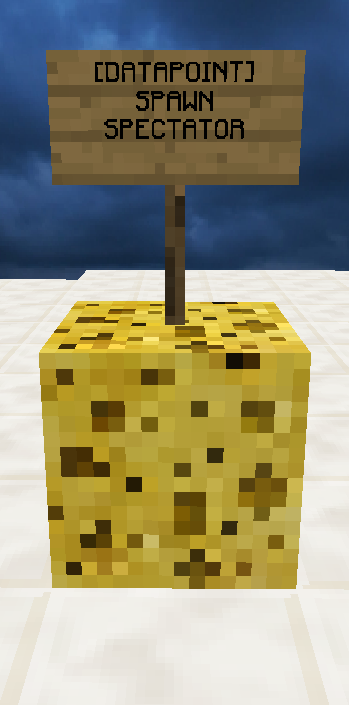
Spectator Spawn
This is where spectators will spawn, and where players will spawn after they’re eliminated. This data point MUST be placed on top of a sponge block and is normally located in the air.
Borders
NOTICE: Please read this section of the Map Guidelines carefully, as if you get the border data points incorrect, your map may not work as you intended it to.
The border data points are important to ensure that players cannot escape out of the map and glitch into spots where they would become unkillable.
Your borders data points should be located on top of a sponge block and should be located in one high corner and one low corner, identical to how you would make a WorldEdit selection.